04
DURATION: 4 WEEKS
(28/10/24 - 22/11/24)

LEARNINGS
- JavaScript
- SVG illustration & export
- Activity diagrams
- CSS animations & transform
- Introduction to Git
- State Machine diagrams
- Random and Math functions
- Don’t Repeat Yourself
- Basic sound recording and manipulation
- Audio web implementation
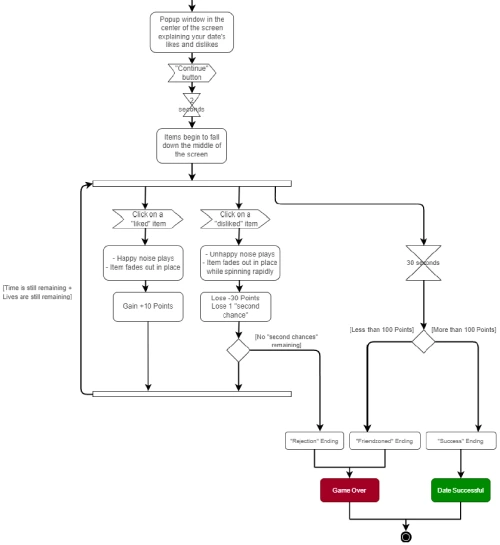
The objective of the “Animation” unit was to create a simple browser game following the gameplay flow of clicking the good moving objects as they fall down from above, and avoiding the bad. Features included in the game included tracking lives/hearts, points, as well as judging whether you win or lose based on your performance.
Of course, everything needed animations as well, and the assets and illustrations used in the game had to be made by ourselves. My game takes the shape of a “dating simulator”, where the romance option has likes and dislikes. You need to accrue enough points by selecting their liked items and avoiding the disliked ones within the set time to win. I sketched out my assets in Clip Studio Paint, my preferred software, and redrew them as coloured svg files afterwards in Adobe Illustrator.
I recorded my audio files in Adobe Audition and used royalty free music for my game. The most challenging part of this project was coding my HTML in a completely different way from what we have learned to do so far, since the containers and classes animated elements rather than stood as standalone content.
I used Git to keep track of my progress and versions to properly document my working process.